微信4.0以上(暂时没找到开内置浏览器的方案,只有开小程序的)
- 微信下载地址https://github.com/cscnk52/wechat-windows-versions/releases/download/v4.1.5.15/weixin_4.1.5.15.exe
- 安装好微信
- 配置fnm环境
plain
https://github.com/Schniz/fnm/releases/download/v1.38.1/fnm-windows.zip
下载下来,并配置系统环境变量path

$env:FNM_NODE_DIST_MIRROR = "https://mirrors.tencent.com/nodejs-release"
$env:NVM_NODEJS_ORG_MIRROR = "https://mirrors.tencent.com/nodejs-release"
fnm install 24
Set-ExecutionPolicy Unrestricted -Scope CurrentUser
New-Item -Type File -Path $PROFILE -Force
notepad $PROFILE
输入下面这一行内容,并保存
fnm env --use-on-cd | Out-String | Invoke-Expression
重新开一个powershell- 下载并运行项目
plain
下载https://github.com/evi0s/WMPFDebugger/archive/refs/heads/main.zip
进入项目

fnm use 24
npm install -g yarn
yarn install
npx ts-node src/index.ts
出现以下两行且没有退出就可以了
[server] debug server running on ws://localhost:9421
[server] proxy server running on ws://localhost:62000- 打开小程序
- 打开浏览器访问
devtools://devtools/bundled/inspector.html?ws=127.0.0.1:62000即可

报错
第四步出现以下两行但是退出了
- 安装文章中用到的微信版本
- 如果已经是文章中的微信版本还是退出了,打开
C:\Users\Administrator\AppData\Roaming\Tencent\xwechat\XPlugin\Plugins\RadiumWMPF目录删除名为18151目录,重试

出现这个原因主要是WMPFDebugger项目,展示没有更新到18151版本,只更新到了18055
微信4.0以下
准备
一键开f12项目
因为采用https://github.com/JaveleyQAQ/WeChatOpenDevTools-Python这个项目,WechatOpenDevTools-Python (1).zip
低版本微信
该项目只支持3.9.10.19版本我建议采用3.9.10.19,该版本微
https://github.com/tom-snow/wechat-windows-versions/releases/tag/v3.9.10.19
CE修改器
微信小号(最好没啥聊天记录的,记录多会导致报错)
低版本微信登陆流程
启动微信和ce

ce修改内存版本
修改前

微信版本 3.9.8.25 → 十六进制 0x63090819 → 只要63090819vx3.9.8.25登录.zip
微信版本 3.9.10.19 → 十六进制 0x63090A13→只要 63090A13
wx3.9.10.19.exe.zip<-以管理员身份双击即可,扫码两次登陆目前只适配3.9.10.19
0xf2593210将其识别为无效或特殊版本,从而绕过正常的版本校验逻辑,具体操作如下
需要注意的是扫码记得扫两次,第一次失败是正常的,记得点x,而不是确定
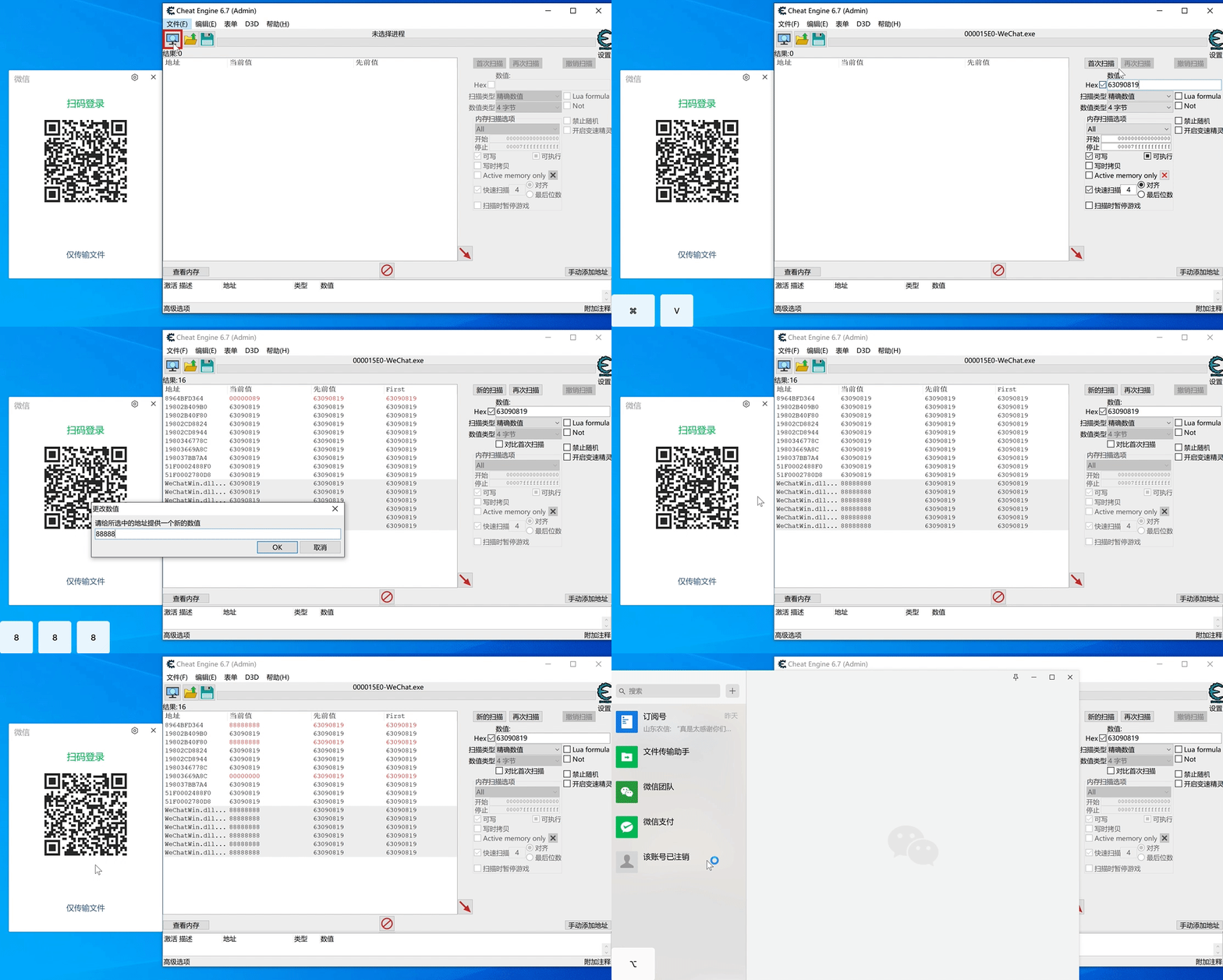
低版本vx开f12流程
- 进入
WechatOpenDevTools-Python所在文件夹 .\WechatOpenDevTools-Python.exe -all,这时会启动一个vx扫码登陆页- 通过上面的低版本微信登陆流程,即可进入微信
- 打开
内置浏览器或者小程序f12即可打开
java
#include <stdio.h>
#include <string.h>
#include <stdlib.h>  // 添加 malloc, rand, srand
#include <time.h>    // 添加 time

struct Role
{
    float pos_x; // 位置x
    float pos_y;
    float pos_z;
    int level;   // 等级
    long money;  // 金钱
};

struct Account
{
    char name[20];     // 名字
    long ID;           // ID
    struct Role* role; // 多个角色信息
};

void decMoney(struct Role* r) {
    r->money -= rand() % 100;
}

int main() {  // 修改返回类型为 int
    srand(time(NULL));  // 设置随机数种子

    printf("GameBoy tester!\r\n");
    struct Account ac;
    strcpy_s(ac.name, sizeof(ac.name), "我是张三啊");
    ac.ID = 20240318;

    // roles
    struct Role* rl = (struct Role*)malloc(sizeof(struct Role) * 4);
    if (rl == NULL) {  // 检查内存分配
        printf("内存分配失败!\n");
        return 1;
    }

    ac.role = rl;
    for (int i = 0; i < 4; i++) {
        rl[i].level = i * 2 + 10;
        rl[i].money = 5000;
        rl[i].pos_x = i * 1000;
        rl[i].pos_y = i * 1100;
        rl[i].pos_z = i * 1200;
    }

    while (1)
    {
        printf("\r\nInput [l,m,p,c,q] to change value (q to quit):");
        char input = getchar();

        // 清除输入缓冲区中的换行符
        while (getchar() != '\n');

        switch (input)
        {
        case 'l':
            for (int i = 0; i < 4; i++) {
                rl[i].level += rand() % 50 / 10;
            }
            break;
        case 'm':
            for (int i = 0; i < 4; i++) {
                rl[i].money += rand() % 20;
            }
            break;
        case 'p':
            for (int i = 0; i < 4; i++) {
                rl[i].pos_x += rand() % 100 * 0.1;
                rl[i].pos_y += rand() % 20 * 0.2;
                rl[i].pos_z += rand() % 10;
            }
            break;
        case 'c':
            for (int i = 0; i < 4; i++) {
                decMoney(&rl[i]);
            }
            break;
        case 'q':  // 添加退出选项
            printf("退出程序...\n");
            free(rl);  // 释放内存
            return 0;
        default:
            printf("无效输入,请输入 l, m, p, c 或 q\n");
            continue;
        }

        // print
        printf("\r\nAccount: [%ld] => %s\r\n", ac.ID, ac.name);
        for (int i = 0; i < 4; i++) {
            printf("Role[%d] => Level:%d, Money: %ld, Pos:[%.2f,%.2f,%.2f]\r\n",
                i, rl[i].level, rl[i].money, rl[i].pos_x, rl[i].pos_y, rl[i].pos_z);
        }
        printf("Cheat: Account [0x%lX], ID [0x%lX], Name [0x%lX], role [0x%lX]\r\n",
            (unsigned long)&ac, (unsigned long)&(ac.ID), (unsigned long)ac.name, (unsigned long)&(ac.role));
        printf("Cheat: Role [0x%lX], pos_x [0x%lX], level [0x%lX], money [0x%lX]\r\n",
            (unsigned long)rl, (unsigned long)&(rl[0].pos_x), (unsigned long)&(rl[0].level), (unsigned long)&(rl[0].money));
        printf("Cheat: decMoney [0x%lX], main: [0x%lX]\r\n",
            (unsigned long)decMoney, (unsigned long)main);
    }

    // 理论上不会到达这里,但为了完整性
    free(rl);
    return 0;
}

// 编译命令:
// gcc -o gamebox main.c
// ./gamebox