jxhczhl/jsrpc
常⻅加密⽅式
| 描述 | 单向加密 | ||
| 密钥数量 | 无 | ||
| 应用场景 | |||
| 常用算法 |
常⻅加密场景
- 网站进行
RSA+AES/SM2+SM4传输数据,其中SM4的密钥通过SM2进行加密 - 对称加密数据包
web端加解密函数定位
方法一:接口路径定位
全局搜索加密数据包对应的url
如https://
方法二:特殊变量名定位
方法三:内存漫游(主推)
项目地址
https://github.com/JSREI/ast-hook-for-js-RE
安装方法
git clone https://github.com/CC11001100/ast-hook-for-js-RE.git   //windows用户建议用我的zip包,同时以管理员身份启动cmd/powershell
cd ast-hook-for-js-RE
nvm install v16.20.2
nvm use v16.20.2
npm config set strict-ssl false
npm install
npm install -g anyproxy
npm install anyproxy
npm install -g anyproxy express body-parser shelljs crypto cheerio @babel/core @babel/types @babel/generator
npx anyproxy-ca
安装上一步弹出的ca证书,受信任的根证书颁发机构


开俩窗口分别运行起来
node src/api-server/api-server.js
node src/proxy-server/proxy-server.js
浏览器流量代理到本地10086端口使用方法
贵金属商城
https://gjs.jybank.com.cn:58001/web/pc/#/login
- 流量代理到本地的10086端口
- f12进入网络,刷新页面,获取一段密文
- 使用
hook.search("密文")进行搜索(),一般第一个就是,点击链接进入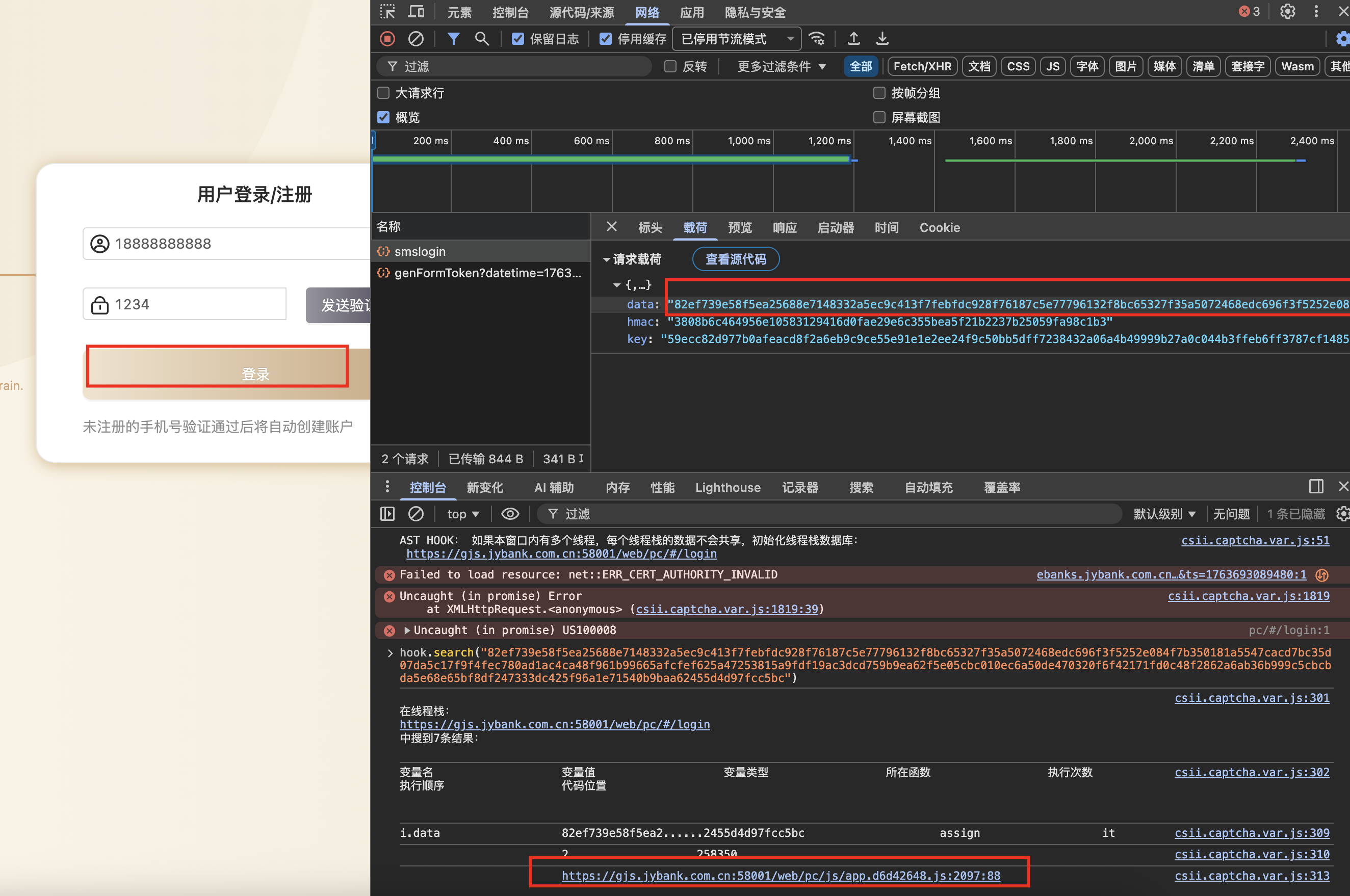
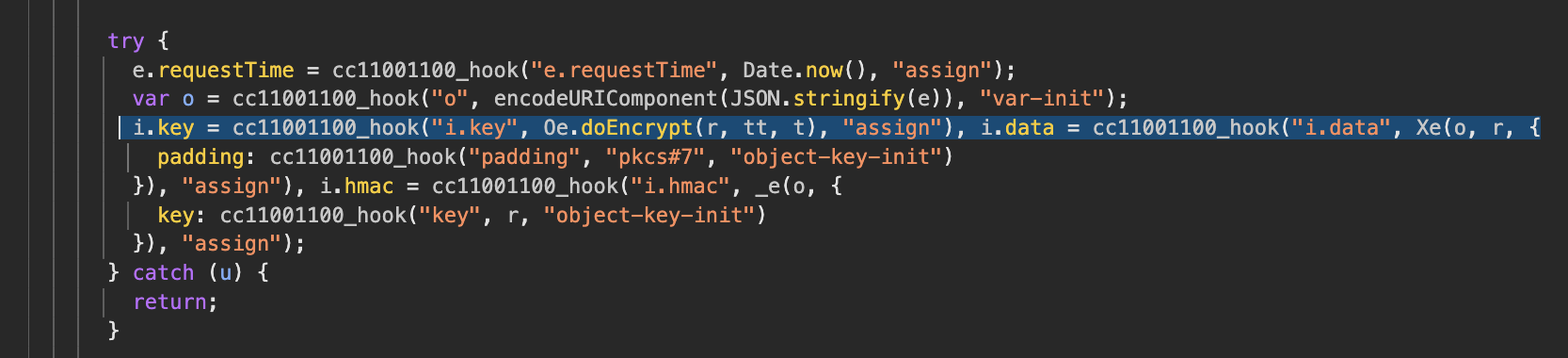
- 跳到入图,可以发现用的关键字是
1.key``0e.doEncrypt
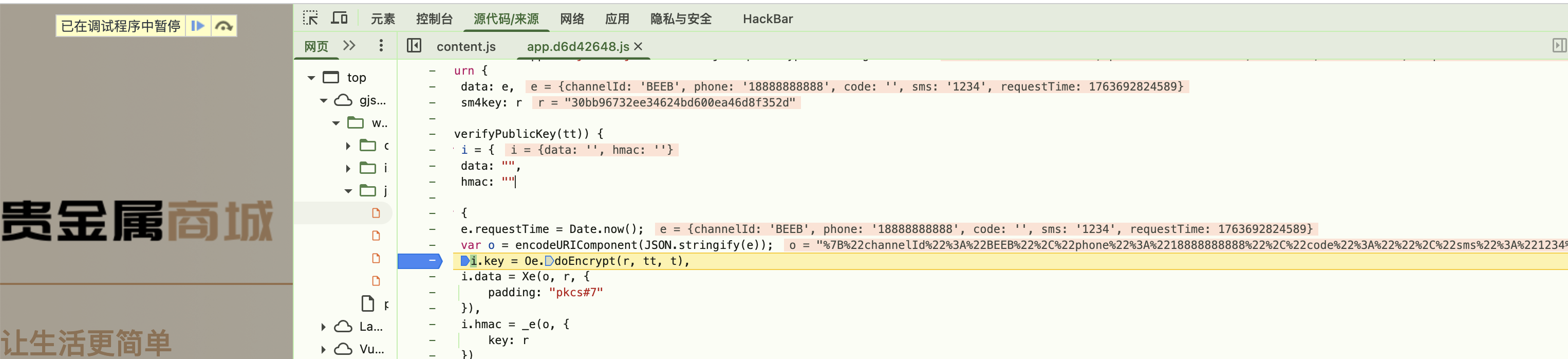
- 取消代理,正常访问,定位关键字,断点,发包,发现成功断到明文加密位置
集中采购管理系统
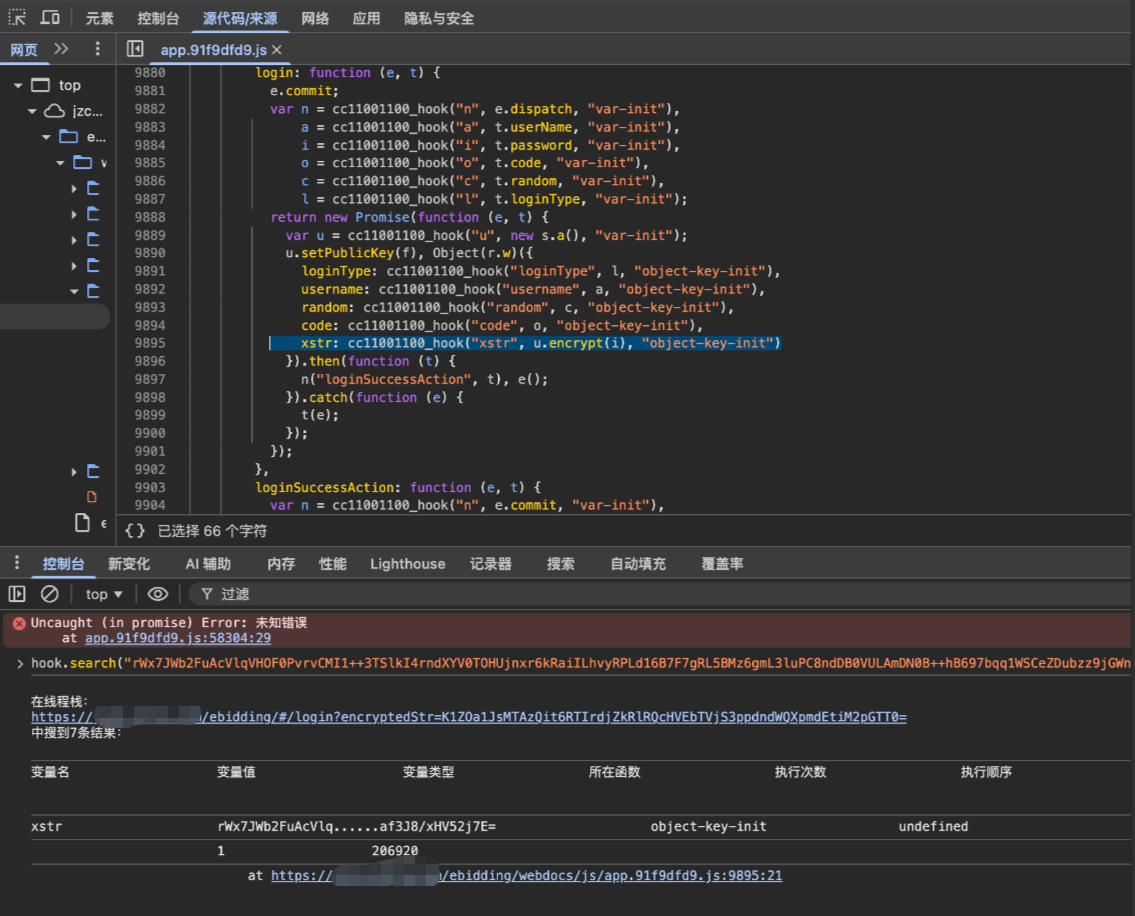
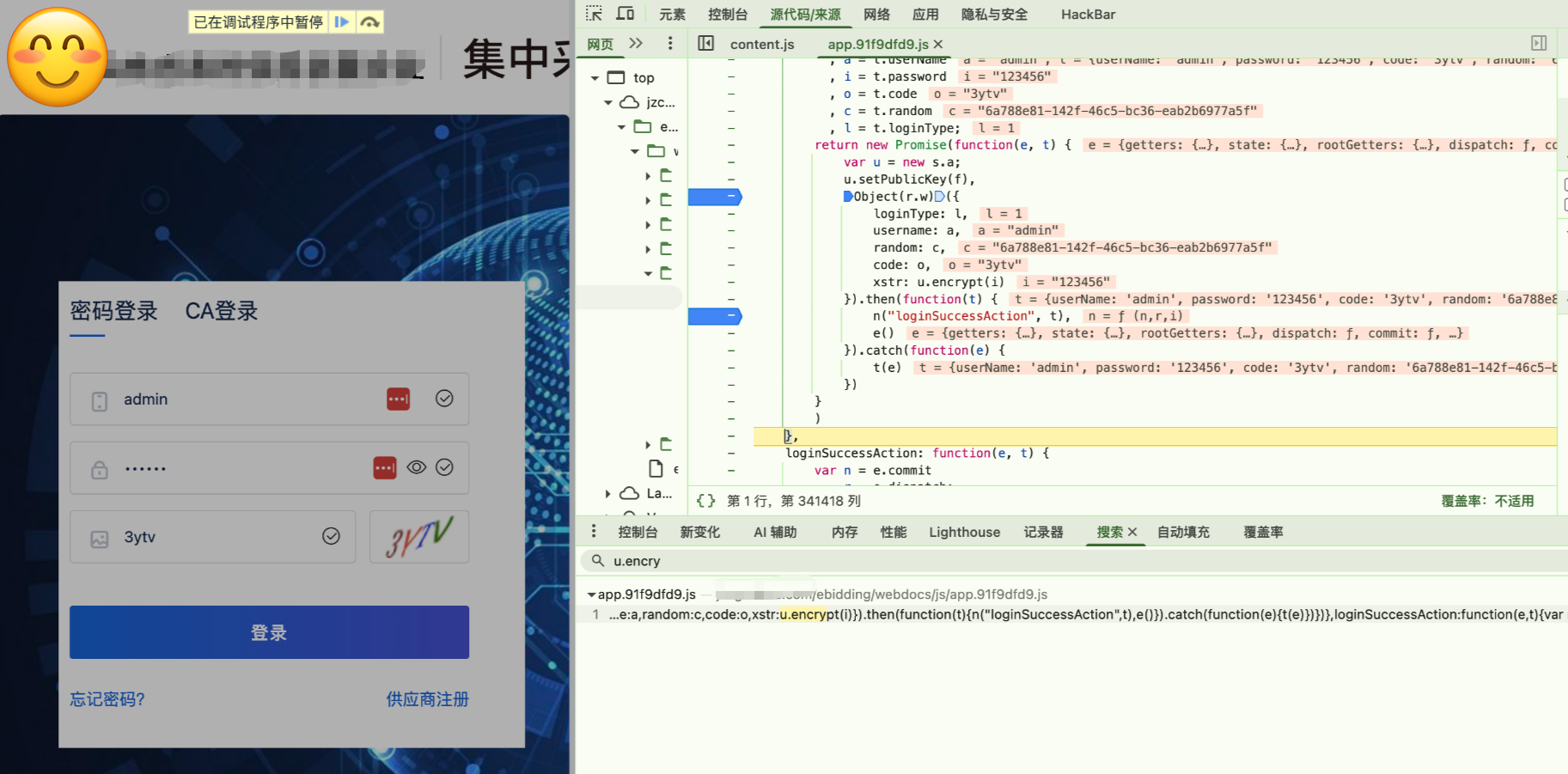
方案不足
- 环境难配
- 如果有本地加密控件,此方法大概率失效
问题排查
- 如果控制台输入hook没动静,说明没注入成功,请检测系统代理、权限等
方法四-hook常见函数
项目地址
https://github.com/cilame/v_jstools
使用方法
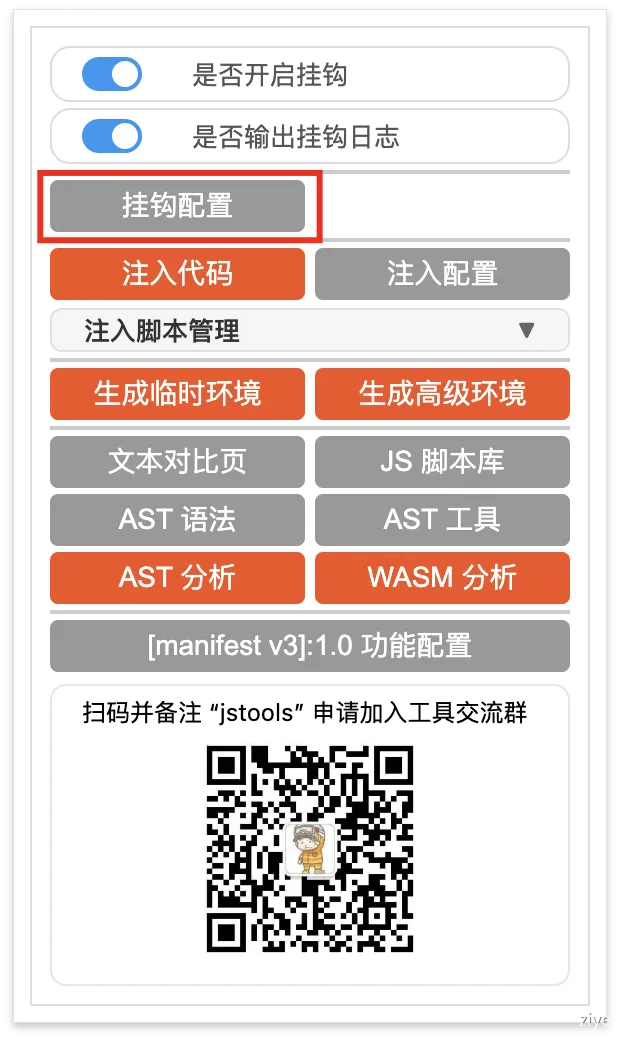
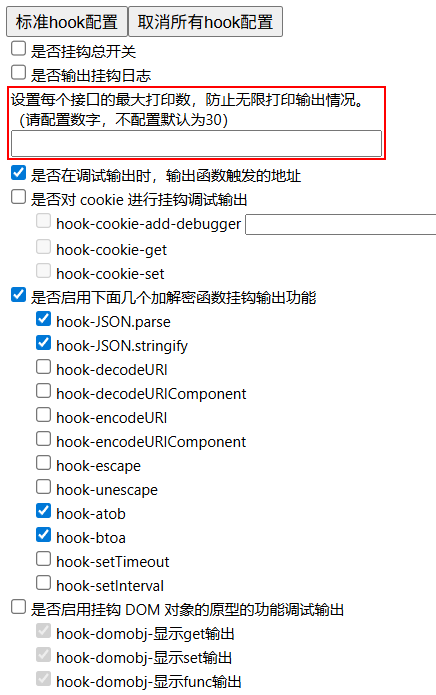
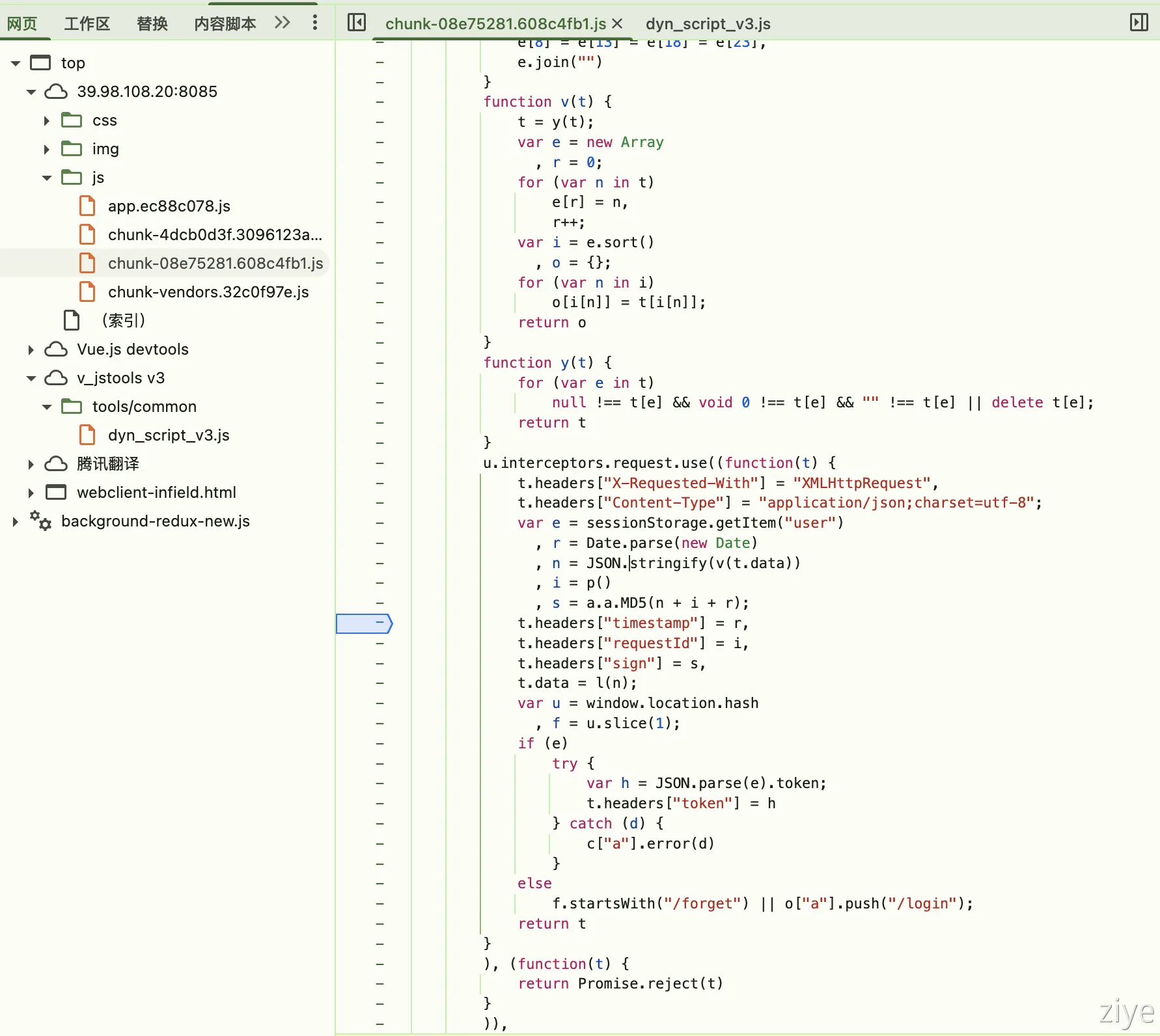
根据图中的勾选即可,由于网站开发者通常系统使用json进行数据传输,以及使用base64编码数据,这边勾上即可在编码时在浏览器控制台输出对应的加密点
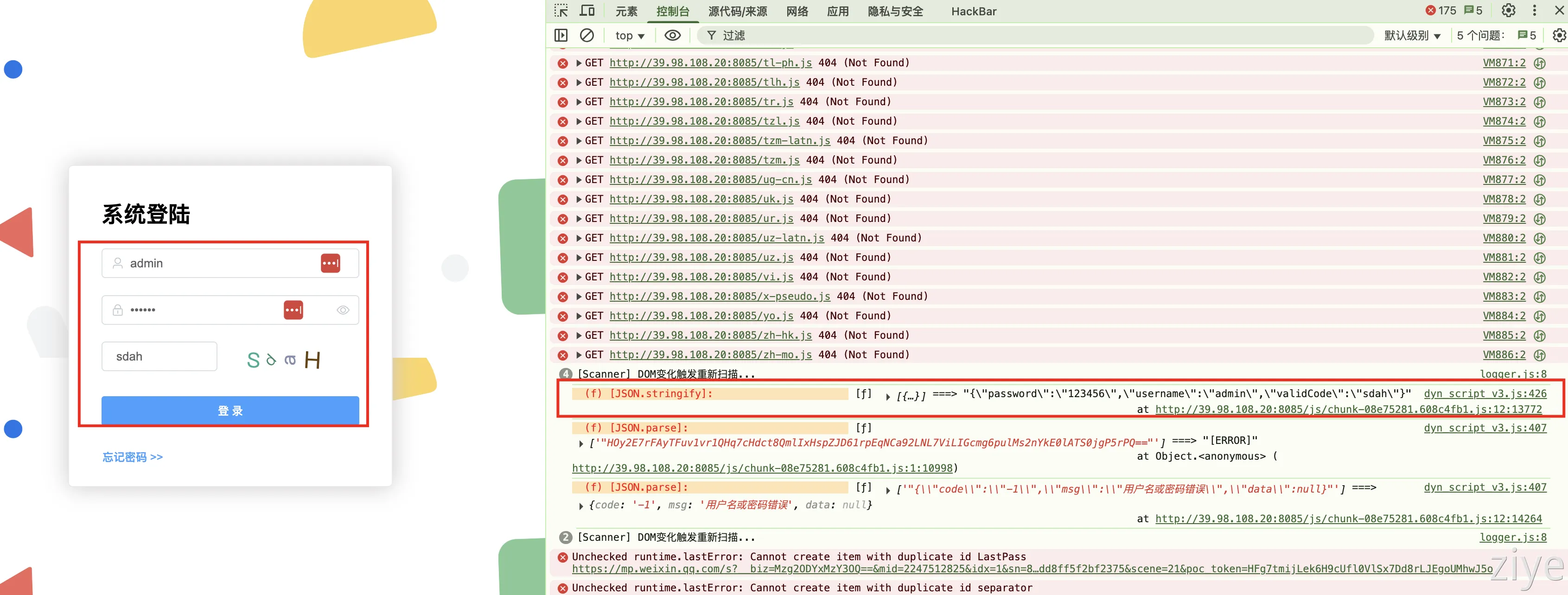
- 当提交登陆表单后,控制台打印如下内容,跟进
方案不足
- 默认只能处理最常见的编码,经常hook不到加密位置
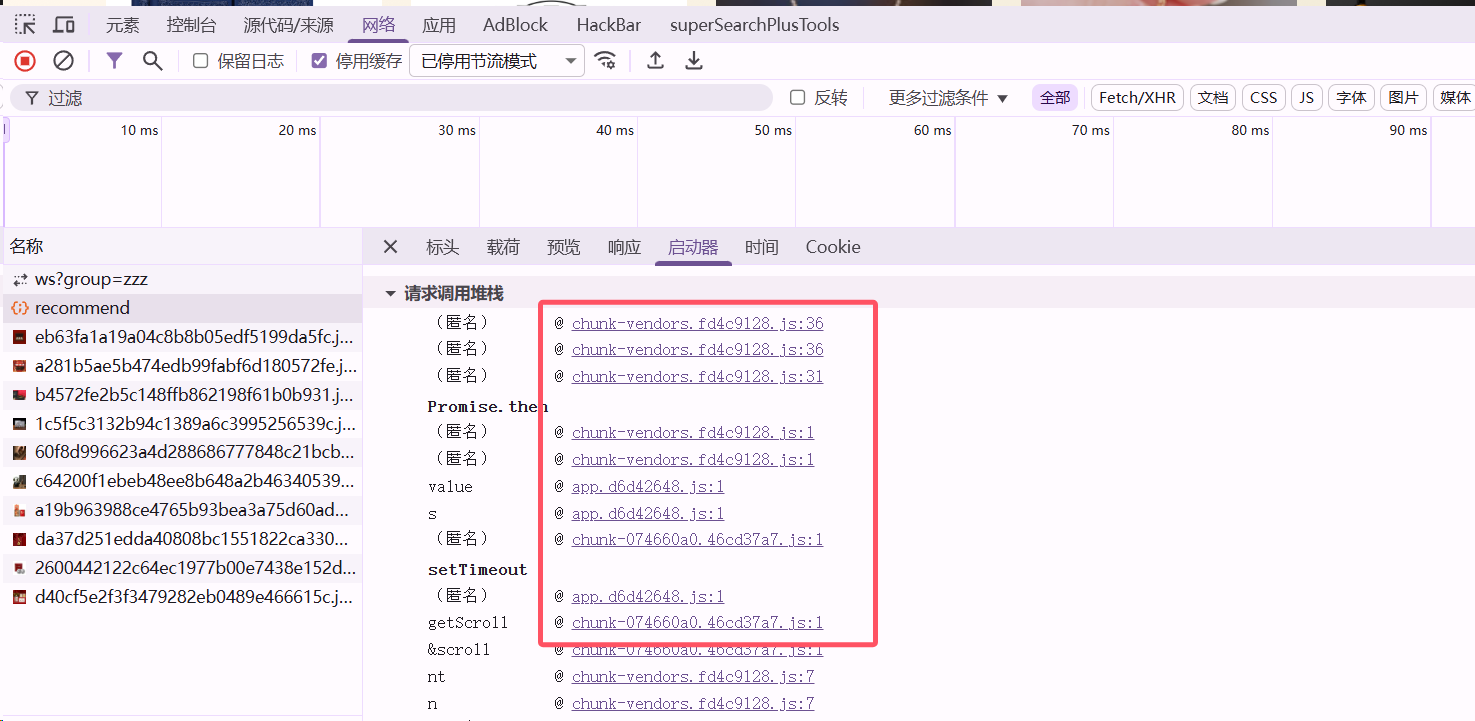
方法五-栈调用
JsRpc
项目地址
https://github.com/jxhczhl/JsRpc
JSRPC 利用 RPC 的核心思想,通过 webSocket 协议将浏览器中的 JS 函数(如加密方法)暴露为远程接口,使外部程序无需逆向分析即可直接调用。其本质是让浏览器执行原生代码,通过接口 “透传” 参数与结果,既绕过了反调试机制,又避免了重写加密逻辑,可以大大降低逆向的工作量
使用方法
贵金属商城
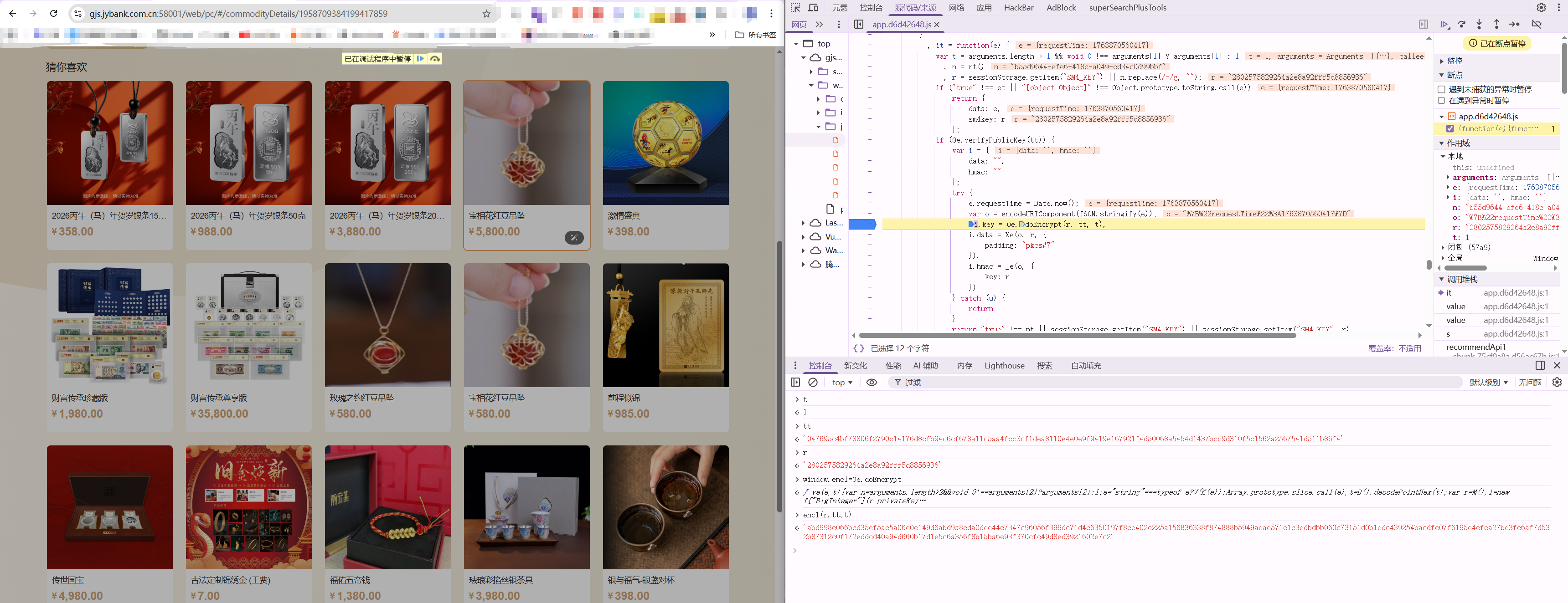
定位加密函数位置
简单的分析
经典sm4传输数据,sm4密钥通过sm2加密,一次一密
由于没有对sm4密钥的签名校验,这边可以固定sm4密钥,即
r = 2802575829264a2e8a92fff5d8856936
tt是sm2公钥,常量
tt = 047695c4bf78806f2790c14176d8cfb94c6cf678a11c5aa4fcc3cf1dea8110e4e0e9f9419e167921f4d50068a5454d1437bcc9d310f5c1562a2567541d511b86f4
t = 1使用方法
启动jsrpc
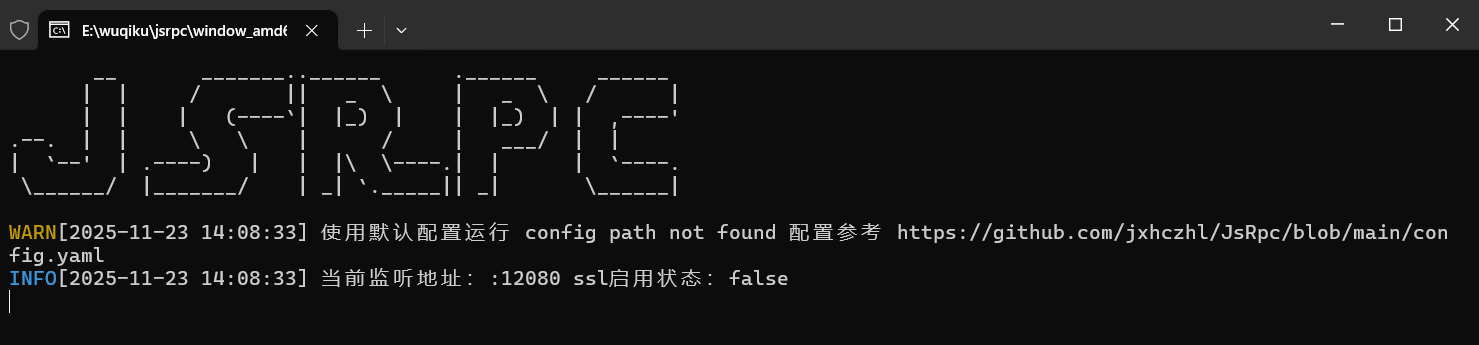
jsrpc注入浏览器
- 放开断点
- 控制台cv代码执行
var rpc_client_id, Hlclient = function (wsURL) {
  this.wsURL = wsURL;
  this.handlers = {
    _execjs: function (resolve, param) {
      var res = eval(param)
      if (!res) {
        resolve("没有返回值")
      } else {
        resolve(res)
      }
    }
  };
  this.socket = undefined;
  if (!wsURL) {
    throw new Error('wsURL can not be empty!!')
  }
  this.connect()
}
Hlclient.prototype.connect = function () {
  if (this.wsURL.indexOf("clientId=") === -1 && rpc_client_id) {
    this.wsURL += "&clientId=" + rpc_client_id
  }
  console.log('begin of connect to wsURL: ' + this.wsURL);
  var _this = this;
  try {
    this.socket = new WebSocket(this.wsURL);
    this.socket.onmessage = function (e) {
      _this.handlerRequest(e.data)
    }
  } catch (e) {
    console.log("connection failed,reconnect after 10s");
    setTimeout(function () {
      _this.connect()
    }, 10000)
  }
  this.socket.onclose = function () {
    console.log('rpc已关闭');
    setTimeout(function () {
      _this.connect()
    }, 10000)
  }
  this.socket.addEventListener('open', (event) => {
    console.log("rpc连接成功");
  });
  this.socket.addEventListener('error', (event) => {
    console.error('rpc连接出错,请检查是否打开服务端:', event.error);
  })
};
Hlclient.prototype.send = function (msg) {
  this.socket.send(msg)
}
Hlclient.prototype.regAction = function (func_name, func) {
  if (typeof func_name !== 'string') {
    throw new Error("an func_name must be string");
  }
  if (typeof func !== 'function') {
    throw new Error("must be function");
  }
  console.log("register func_name: " + func_name);
  this.handlers[func_name] = func;
  return true
}
Hlclient.prototype.handlerRequest = function (requestJson) {
  var _this = this;
  try {
    var result = JSON.parse(requestJson)
  } catch (error) {
    console.log("请求信息解析错误", requestJson);
    return
  }
  if (result["registerId"]) {
    rpc_client_id = result['registerId']
    return
  }
  if (!result['action'] || !result["message_id"]) {
    console.warn('没有方法或者消息id,不处理');
    return
  }
  var action = result["action"], message_id = result["message_id"]
  var theHandler = this.handlers[action];
  if (!theHandler) {
    this.sendResult(action, message_id, 'action没找到');
    return
  }
  try {
    if (!result["param"]) {
      theHandler(function (response) {
        _this.sendResult(action, message_id, response);
      })
      return
    }
    var param = result["param"]
    try {
      param = JSON.parse(param)
    } catch (e) {
    }
    theHandler(function (response) {
      _this.sendResult(action, message_id, response);
    }, param)
  } catch (e) {
    console.log("error: " + e);
    _this.sendResult(action, message_id, e);
  }
}
Hlclient.prototype.sendResult = function (action, message_id, e) {
  if (typeof e === 'object' && e !== null) {
    try {
      e = JSON.stringify(e)
    } catch (v) {
      console.log(v)//不是json无需操作
    }
  }
  this.send(JSON.stringify({"action": action, "message_id": message_id, "response_data": e}));
}
var demo = new Hlclient("ws://127.0.0.1:12080/ws?group=zzz");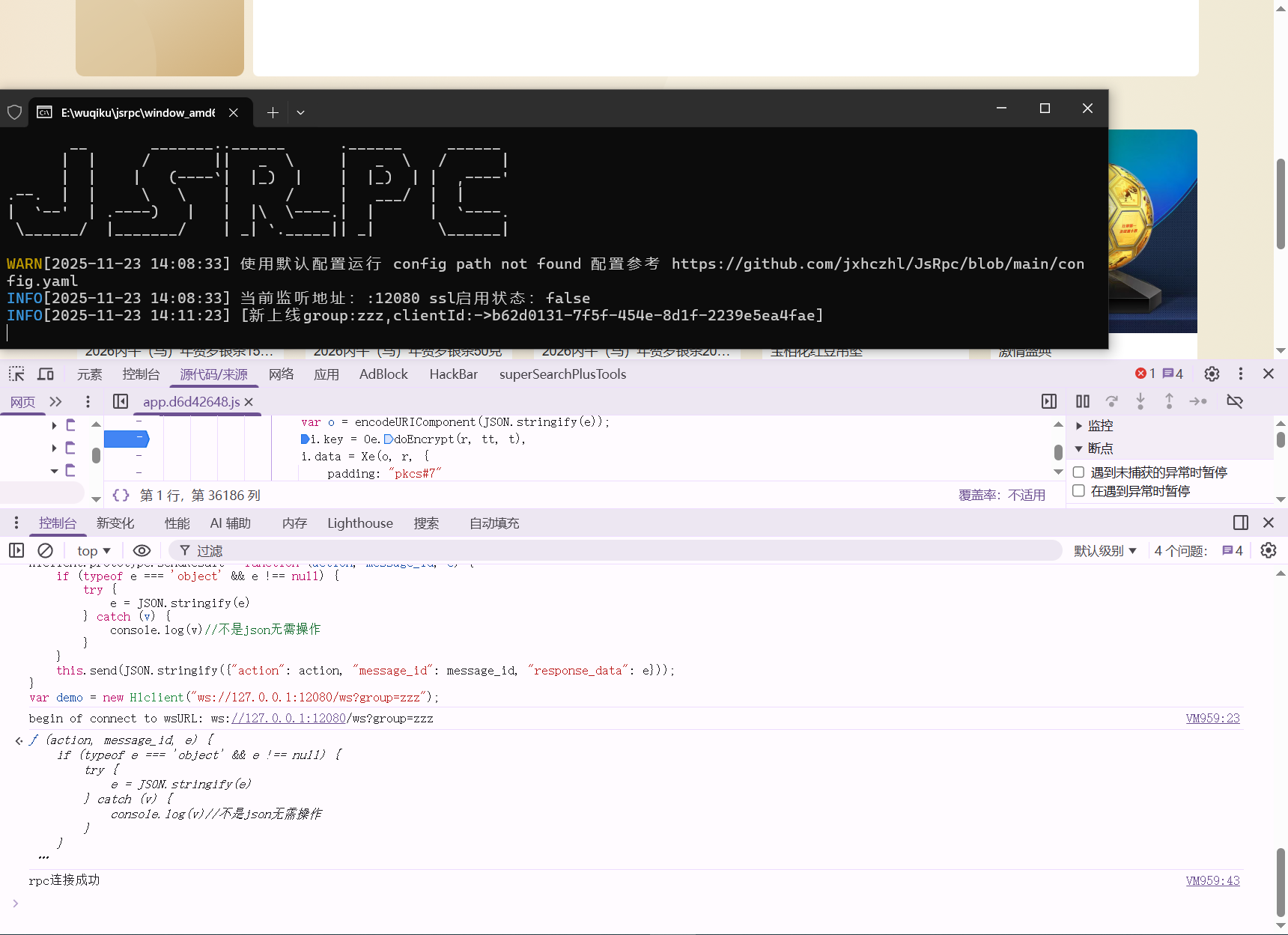
编写远程调用的函数
涉及到的临时加密函数有Oe.doEncrypt、Xe、_e三个,为了全局调用这里赋值给自定义的全局变量,即
window.enc1=Oe.doEncrypt
window.data1=Xe
window.hmac1=_e
demo.regAction("getkey1", function (resolve,param) {
    r = "2802575829264a2e8a92fff5d8856936"
    tt = "047695c4bf78806f2790c14176d8cfb94c6cf678a11c5aa4fcc3cf1dea8110e4e0e9f9419e167921f4d50068a5454d1437bcc9d310f5c1562a2567541d511b86f4"
    t = "1"
    res= enc1(r, tt, t)
    resolve(res);
})
demo.regAction("getdata1", function (resolve,param) {
//由于o是需要传进来的内容,使用param["o"]接受参数
    res=data1(JSON.stringify(param["o"]), '2802575829264a2e8a92fff5d8856936', {padding: "pkcs#7"})
    resolve(res);
})
demo.regAction("gethmac1", function (resolve,param) {
    //这里还是param参数 param里面的key 是先这里写,但到时候传接口就必须对应的上
    r = "2802575829264a2e8a92fff5d8856936"
    res=hmac1(JSON.stringify(param["o"]), {key: r})
    resolve(res);
})POST /go HTTP/1.1
Host: 127.0.0.1:12080
User-Agent: Mozilla/5.0 (Windows NT 10.0; Win64; x64) AppleWebKit/537.36 (KHTML, like Gecko) Chrome/83.0.4103.116 Safari/537.36
Content-Type: application/x-www-form-urlencoded
Content-Length: 24
action=getkey1&group=zzz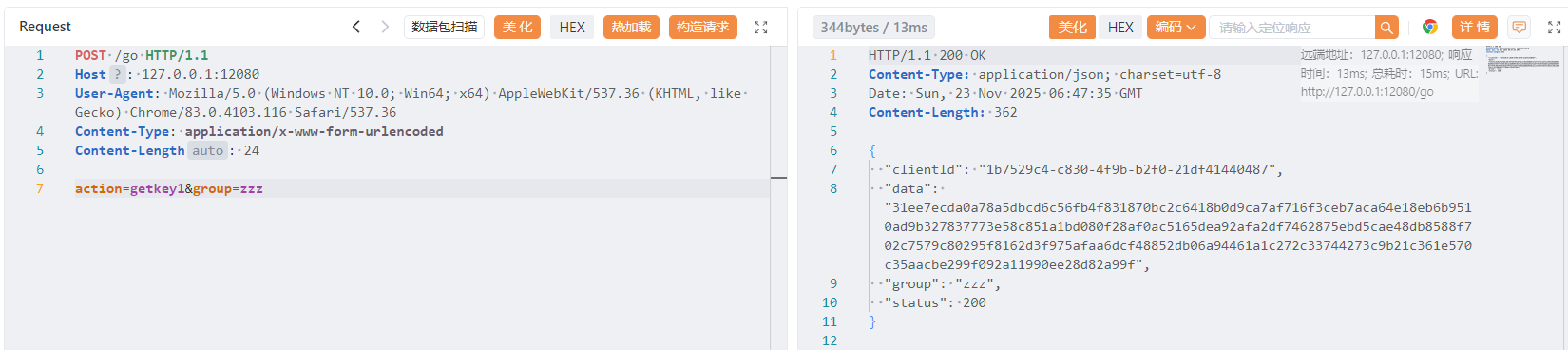
POST /go HTTP/1.1
Host: 127.0.0.1:12080
User-Agent: Mozilla/5.0 (Windows NT 10.0; Win64; x64) AppleWebKit/537.36 (KHTML, like Gecko) Chrome/83.0.4103.116 Safari/537.36
Content-Type: application/x-www-form-urlencoded
Content-Length: 24
action=gethmac1&group=zzz¶m={"o":{"requestTime":1763879406185}}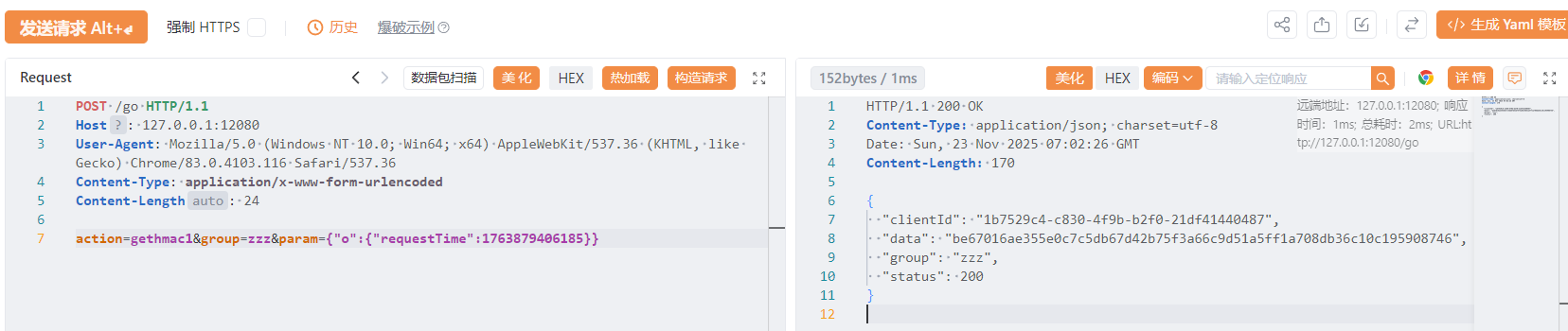
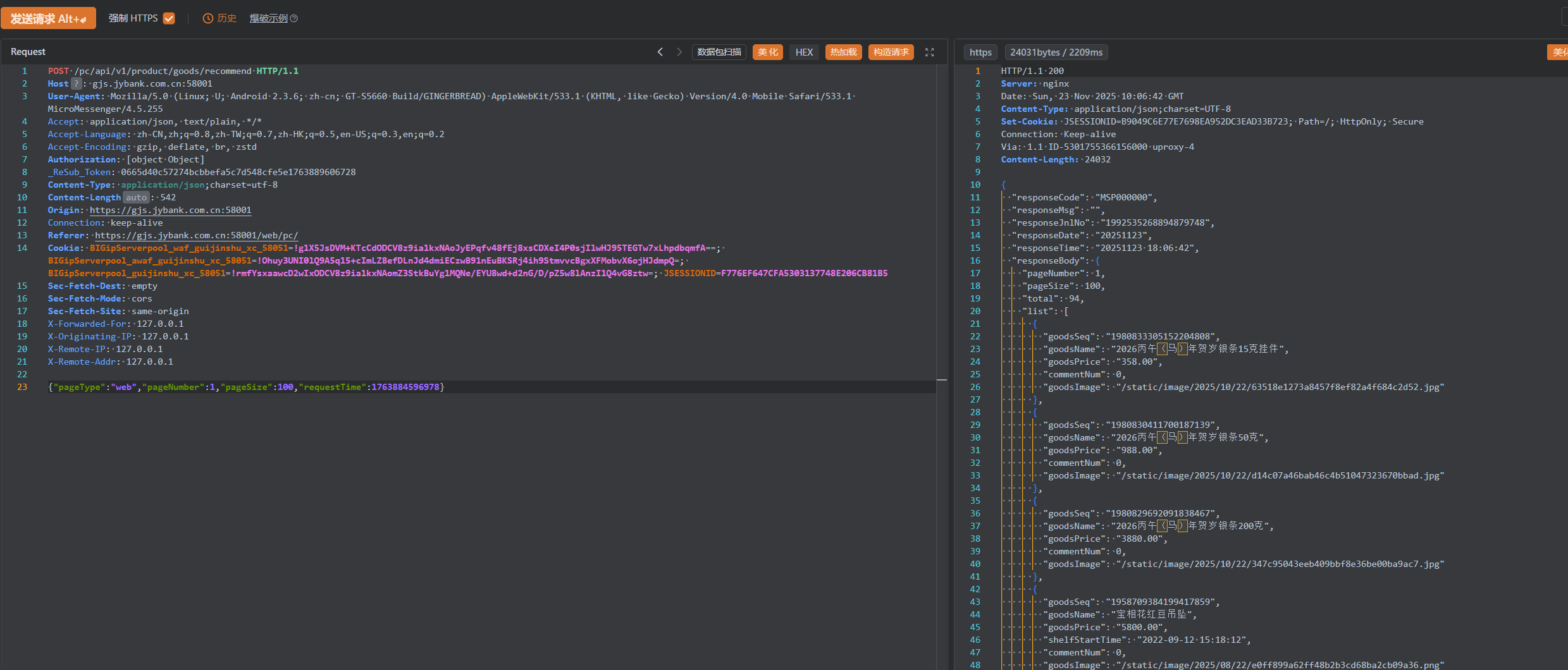
编写yakit热加载,实现明文数据传输
jsrpcReq = func(a) {
group = "zzz"
action1 = "getkey1"
action2 = "getdata1"
action3 = "gethmac1"
param1 = "{\"o\":" + a + "}"
rsp, rep = poc.Post(
"http://127.0.0.1:12080/go",
poc.replaceBody(
"group=" + group + "&action=" + action2 + "¶m=" + param1,
false,
),
poc.appendHeader("Content-Type", "application/x-www-form-urlencoded"),
)~
rsp1, rep1 = poc.Post(
"http://127.0.0.1:12080/go",
poc.replaceBody(
"group=" + group + "&action=" + action3 + "¶m=" + param1,
false,
),
poc.appendHeader("Content-Type", "application/x-www-form-urlencoded"),
)~
rsp2, rep2 = poc.Post(
"http://127.0.0.1:12080/go",
poc.replaceBody(
"group=" + group + "&action=" + action1,
false,
),
poc.appendHeader("Content-Type", "application/x-www-form-urlencoded"),
)~
o = {
"data": json.loads(rsp.GetBody()).data,
"hmac": json.loads(rsp1.GetBody()).data,
"key": json.loads(rsp2.GetBody()).data
}
b = json.dumps(o)
return b
}
// beforeRequest 允许在每次发送数据包前对请求做昀后的处理
beforeRequest = func(https, originReq, req) {
body = poc.GetHTTPPacketBody(req)
// 如果请求体不为空且长度大于0,则进行处理
if body != nil && len(body) > 0 {
encryptedParam = jsrpcReq(string(body))
// 将结果添加到请求头中的"si"字段
req = poc.ReplaceBody(req, encryptedParam, false)
}
// 返回修改后的请求
return []byte(req)
}
afterRequest = func(https, originReq, req, originRsp, rsp) {
body = poc.GetHTTPPacketBody(rsp)
if body != nil && len(body) > 0 {
parsed = json.loads(string(body))
encData = parsed["data"]
key = codec.DecodeHex("2802575829264a2e8a92fff5d8856936")~
decData = codec.Sm4ECBDecryptWithPKCSPadding(key, codec.DecodeHex(encData)~, nil)~
parsed["data"] = string(decData)
newBody = []byte(json.dumps(parsed))
rsp = poc.ReplaceBody(rsp, newBody, false)
}
return []byte(rsp)
}
至于mitm模块的热加载需要改一下,懒得写了
小程序调试
项目地址
- 微信安装包()
https://github.com/tom-snow/wechat-windows-versions/releases/tag/v3.9.10.19
- 一键开f12
https://github.com/JaveleyQAQ/WeChatOpenDevTools-Python
使用方法
- 安装微信
- 下载
WechatOpenDevTools-Python.exe - 启动微信
WechatOpenDevTools-Python.exe -xdevtools打开控制台
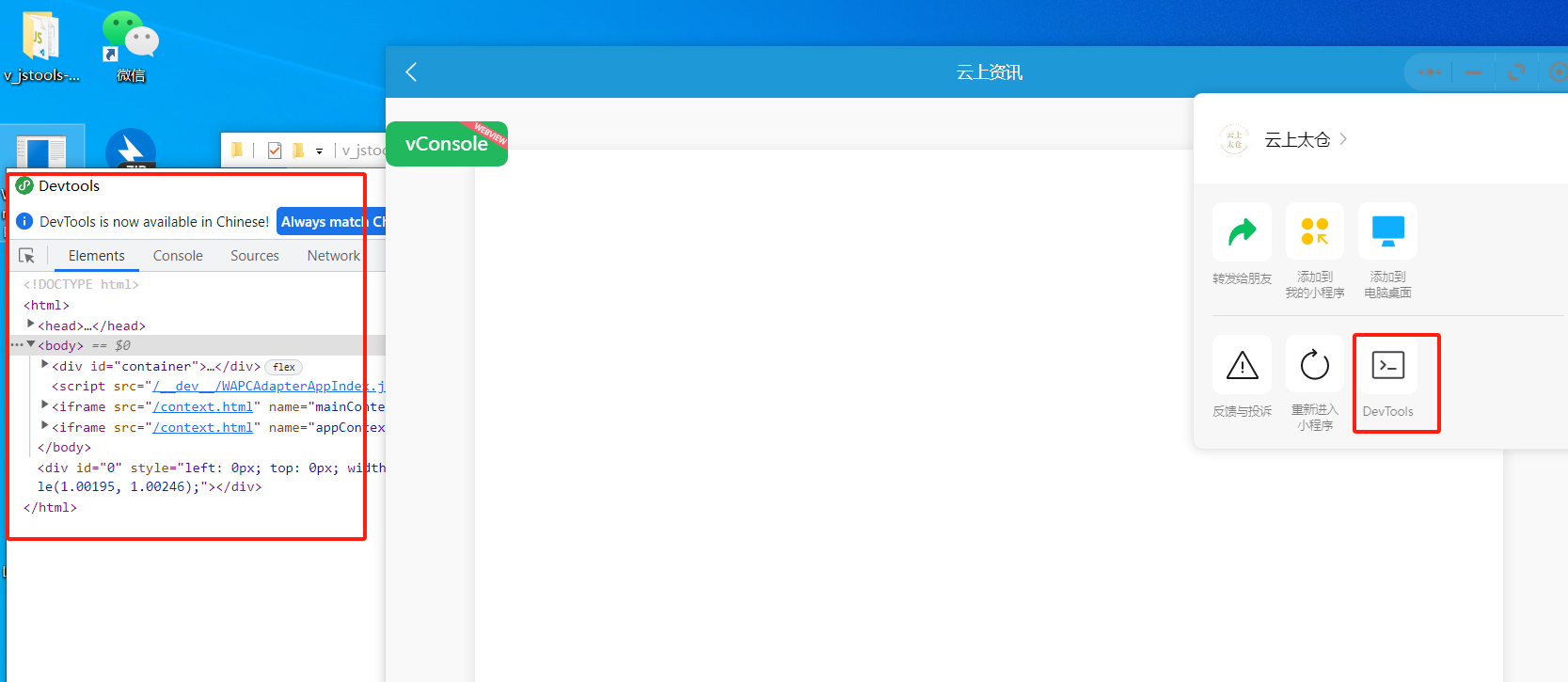
补充
arm版本一键f12工具
https://github.com/f4l1k/WeChatOpenDevTools-Python-arm
无法全局搜索
https://mp.weixin.qq.com/s/vA35tVd0Ag2J-p0xjY5ZyA
或者在appcontext/usr目录下的app-service.js中进行搜索
微信jsrpc
function createRpcClient(wsURL) {
  let rpc_client_id = wx.getStorageSync('rpc_client_id');
  let socket = null;
  const handlers = {};

  if (rpc_client_id && wsURL.indexOf("clientId=") === -1) {
    wsURL += "&clientId=" + rpc_client_id;
  }

  function connect() {
    console.log("开始连接:", wsURL);
    socket = wx.connectSocket({
      url: wsURL,
      success() { console.log("连接成功"); },
      fail(err) {
        console.error("连接失败:", err);
        reconnect();
      }
    });

    wx.onSocketOpen(() => console.log("Socket 打开"));
    wx.onSocketError(err => console.error("Socket 错误:", err));
    wx.onSocketClose(() => {
      console.log("Socket 关闭");
      reconnect();
    });

    wx.onSocketMessage(res => handleRequest(res.data));
  }

  function reconnect() {
    console.log("10秒后重连...");
    setTimeout(connect, 10000);
  }

  function send(msg) {
    if (socket && socket.readyState === 1) {
      wx.sendSocketMessage({
        data: msg,
        fail(err) {
          console.error("发送失败:", err);
        }
      });
    }
  }

  function sendResult(action, message_id, data) {
    if (typeof data === 'object') {
      try { data = JSON.stringify(data); } catch (e) {}
    }
    const response = JSON.stringify({
      action, message_id, response_data: data
    });
    send(response);
  }

  function handleRequest(raw) {
    try {
      const msg = JSON.parse(raw);

      if (msg.registerId) {
        rpc_client_id = msg.registerId;
        wx.setStorageSync('rpc_client_id', rpc_client_id);
        return;
      }

      const { action, message_id, param } = msg;
      if (!action || !message_id) return;

      const handler = handlers[action];
      let parsedParam = param;
      try { parsedParam = JSON.parse(param); } catch (e) {}

      if (!handler) {
        sendResult(action, message_id, "Handler not found");
        return;
      }

      handler(res => {
        sendResult(action, message_id, res);
      }, parsedParam);

    } catch (err) {
      console.error("解析消息失败:", err);
    }
  }

  function regAction(name, func) {
    handlers[name] = func;
  }

  // 默认注册 execjs 方法
  regAction("_execjs", (resolve, param) => {
    try {
      const result = eval(param);
      resolve(result || "没有返回值");
    } catch (e) {
      resolve("执行错误:" + e.message);
    }
  });

  connect();

  return {
    regAction,
    send
  };
}

var demo = createRpcClient("ws://127.0.0.1:12080/ws?group=zzz");
globalThis.wx = wx
globalThis.test = n

demo.regAction("getData", function (resolve,param) {
    //这里还是param参数 param里面的key 是先这里写,但到时候传接口就必须对应的上
    resolve(test.encrypt(param["t"], "347830335063457247244E55686E5266"));
})如果不能用就参考https://github.com/jxhczhl/JsRpc/issues/25
案例一:南京银行鑫微厅
- 定位加密位置
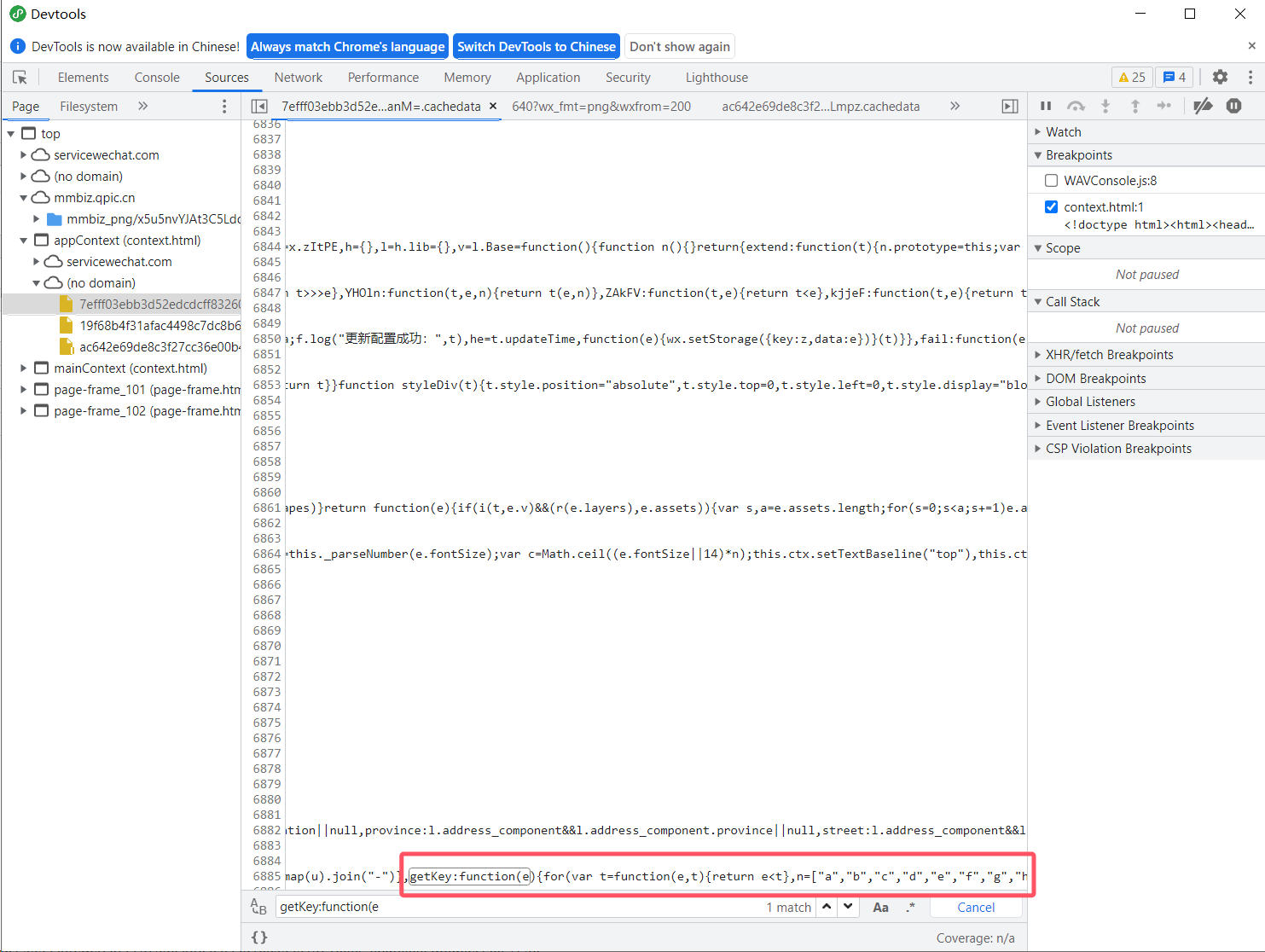
方法一:ce改内存
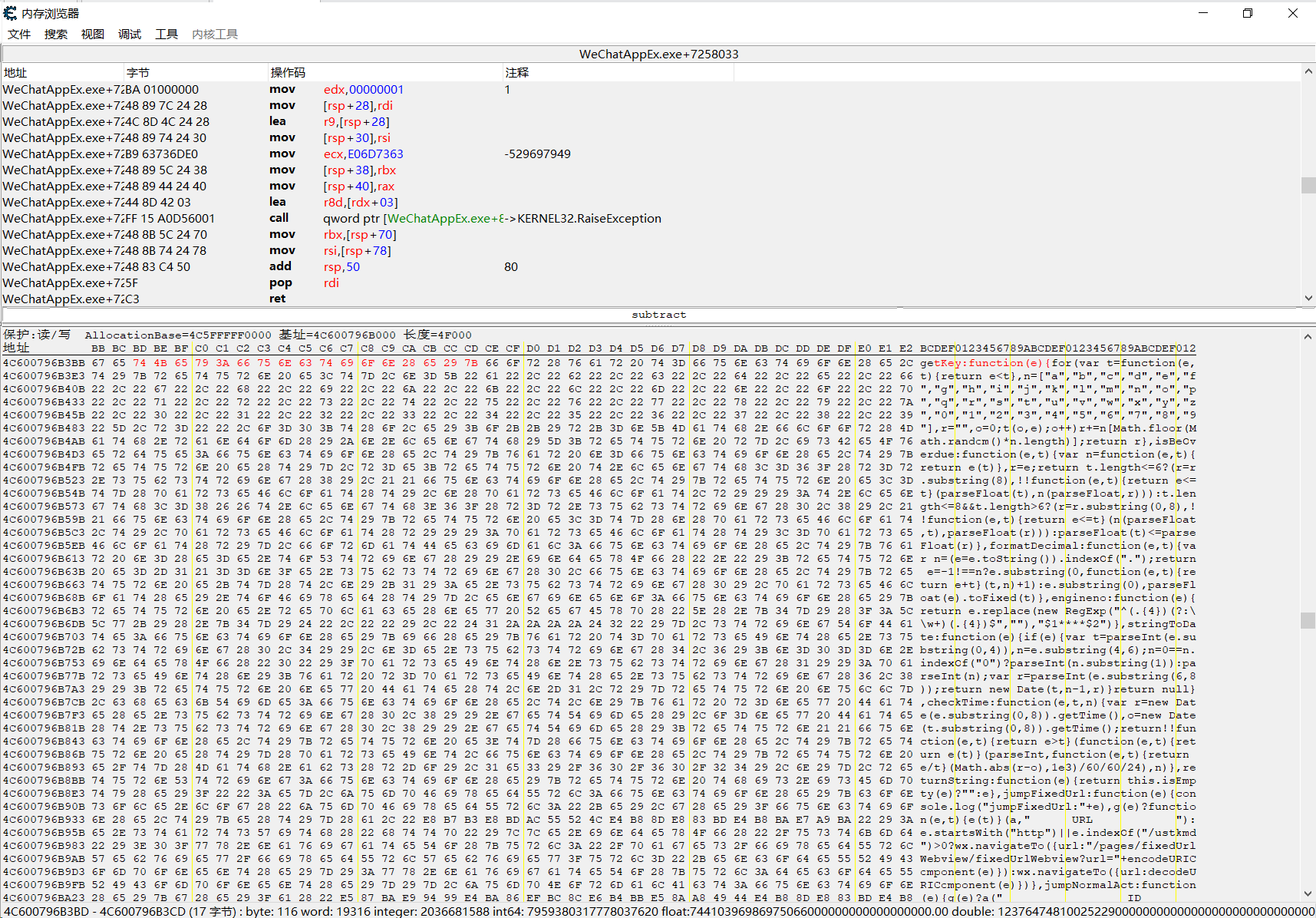
原
for(var t=function(e,t){return e<t},n=["a","b","c","d","e","f","g","h","i","j","k","l","m","n","o","p","q","r","s","t","u","v","w","x"
改成
for(var t=function(e,t){return "123123123123"/*11111111111111111111111111111111111*/

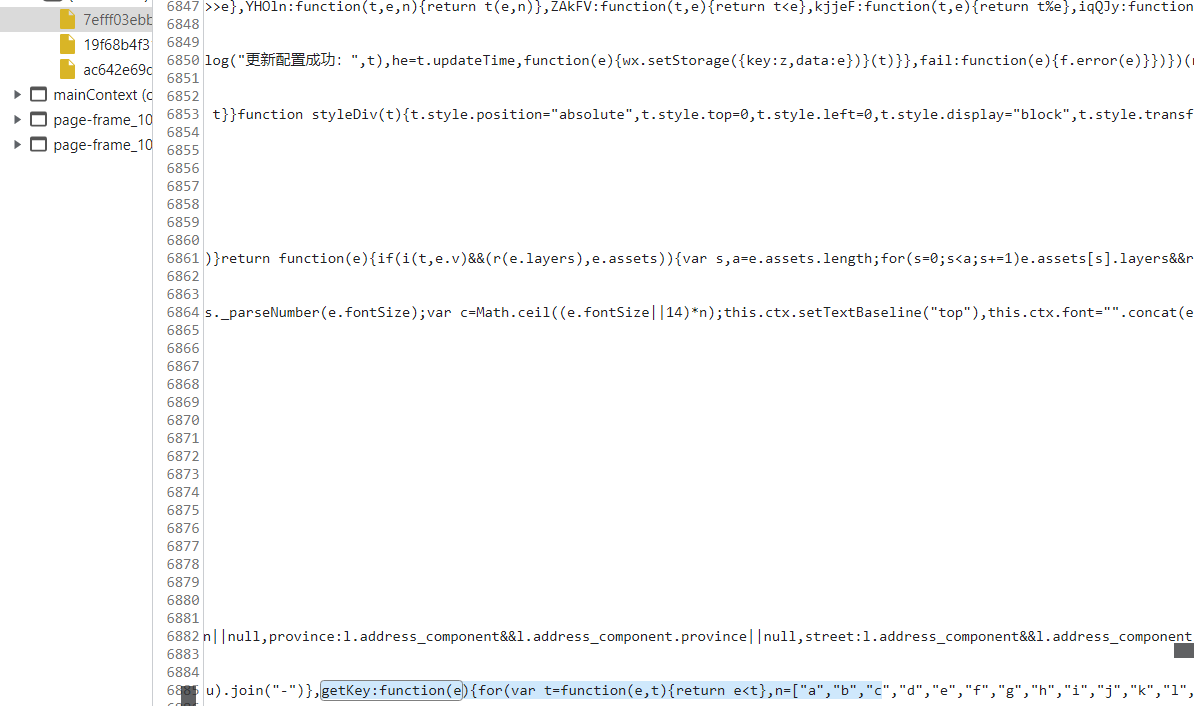
不好操作不写了,记得字符数对上,不然会报错方法二:改js(主推)
- 清理掉本地所有小程序相关文件
- bp抓包,在加密的js出现时,响应中加入固定的key,使本地保存的js是修改后的js,后面小程序优先调用本地js就可以固定密钥了
App
前置
- frida(最好是过检测的)
https://github.com/frida/frida
- reqable(小黄鸟)
- jadx
- 脱壳机/在线脱壳网站
- r0capture
https://github.com/r0ysue/r0capture
- 查壳工具